Running Playwright with GPU powered Actions
February 23, 2026
TL;DR: Using a GPU runner for your GitHub Actions doesn’t automatically give you GPU acceleration in Chromium. You need xvfb in headed mode, special Chrome flags, and you’ll need to load the NVIDIA kernel modules yourself.
Table Slayer is a deceptively complex application. Unlike most virtual table tops it uses Three JS for its core map renderer and effects. Despite looking 2D, it utilizes a full “layer” system which can independently use post-processing and various shaders. The only real negative to this strategy is performance, and the need for a GPU of some kind. The core system is still pretty lightweight, and most mid-weight mini PCs do just fine. The biggest issue comes when you want to run automated end-to-end tests with Playwright. The default GitHub action runners are bare bones shared linux machines with 2 core and not a lot of memory. Tests would often hit one to two minute runtimes because loading the editor alone would take 30 seconds.
The obvious solution: use a GPU runner! GitHub has them now. Problem solved, right?
Nope.
This should be easy
For those unaware, at a team or organization level GitHub allows you to create hardware profiles that your actions run. I have three set up, the beefiest is gpu-linux-4, which gives me a NVIDIA Tesla T4 with 16GB VRAM. I figured all I had to do as turn it on. Github allows you to run each job within your Actions separately on the runner of your choice with a simple runs-on syntax.
tests-web:
  if: github.event.pull_request.draft == false
  # Use GPU runner for faster WebGL rendering (Tesla T4)
  runs-on: gpu-linux-4
  name: web tests
  run: pnpm run test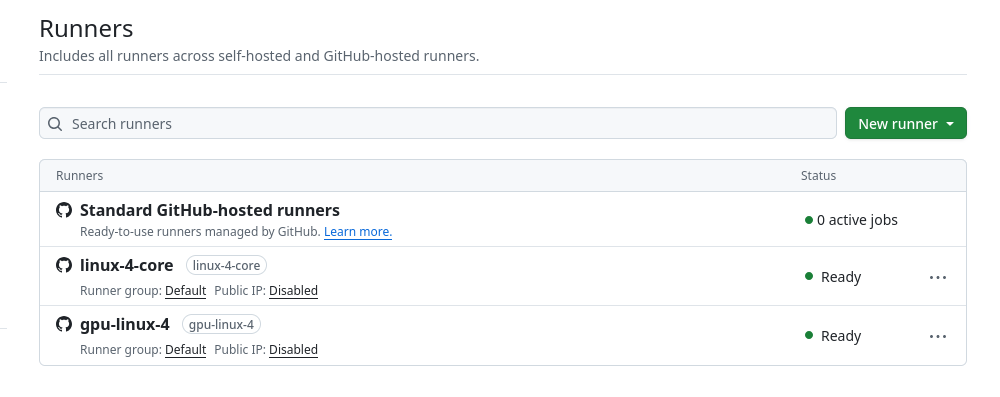
You'll need to set up a GPU runner in your GitHub organization
Unfortunately, using the new runner resulted in single tests still taking five minutes. The 3D canvas alone took 30 seconds to load each time.
I had Claude add a diagnostic test to check what WebGL renderer Chromium was actually using, thinking something might be off. When running the action it returned:
Renderer: ANGLE (Google, Vulkan 1.3.0 (SwiftShader Device...))
Status: SOFTWARE RENDERING
SwiftShader. That’s Chromium’s built-in software renderer. It was completely ignoring the Tesla T4 GPU.
The first realization: headless Chromium doesn’t use GPUs
Turns out, headless Chromium doesn’t use GPU hardware by default, which I guess makes sense. The fix? Run in headed mode with xvfb (X Virtual Framebuffer). xvfb creates a virtual display, and headed Chromium will actually use the GPU rendering pipeline.
tests-web:
  if: github.event.pull_request.draft == false
  # Use GPU runner for faster WebGL rendering (Tesla T4)
  runs-on: gpu-linux-4
  name: web tests
  steps:
  # ...
  # A bunch of steps for installing browsers...etc
  # ...
  # Then when running the actual tests
  - name: Run Playwright Tests
    if: ${{ github.ref != 'refs/heads/main' }}
    working-directory: apps/web
    run: |
      xvfb-run --auto-servernum --server-args="-screen 0 1920x1080x24" pnpm run test:xvfb
In the Playwright config, you need to add Chrome flags to encourage GPU usage:
const gpuArgs = process.env.CI
  ? [
      '--ignore-gpu-blocklist',
      '--use-angle=vulkan',
      '--enable-features=Vulkan',
      '--use-gl=angle',
      '--enable-gpu-rasterization',
      '--enable-zero-copy'
    ]
  : [];
This actually improved the speeds, cutting them in half, but it was still way above what they should be. When running tests on the runner it showed a new renderer being used.
Renderer: ANGLE (Mesa, Vulkan 1.4.318 (llvmpipe (LLVM 20.1.2...)))llvmpipe is Mesa’s software renderer. Way faster than SwiftShader, but still not hardware acceleration, so the GPU still wasn’t being used. Frustrating.
Side quest: can we just use xvfb on a cheaper runner?
At this point I thought - if it’s just using software rendering anyway, why pay for a GPU runner? Let’s try xvfb on a standard linux-4-core runner. I’ll have slow tests, if they run slow anyway with the GPU runner, at least I’m not paying triple the price.
Nope. When running the same tricks, but with a standard non-gpu running it went back to SwiftShader, and back to 5+ minute test times.
The hosted GitHub GPU runner image (“Ubuntu NVIDIA GPU-Optimized Image for AI and HPC”) comes with mesa and llvmpipe pre-installed. The standard Ubuntu runner doesn’t have those - it only has Chromium’s built-in SwiftShader. So even the “failed” GPU setup was giving us a 3x speedup just from the better software renderer in the image.
I went back to the GPU runner.
The second realization: the GPU driver isn’t loaded
In the tests I ran nvidia-smi in CI to check on our fancy GPU:
NVIDIA-SMI has failed because it couldn't communicate with the NVIDIA driver.Wait, what? We have a GPU runner with a Tesla T4 but the driver isn’t working?
Then I checked for device files:
/dev/nvidiactl  ← exists
/dev/nvidia0   ← missing!
The NVIDIA driver is installed on the GPU runner image, but the kernel modules aren’t loaded by default. The /dev/nvidia0 device (the actual GPU) only appears after you load the modules.
The ultimate fix
tests-web:
  if: github.event.pull_request.draft == false
  # Use GPU runner for faster WebGL rendering (Tesla T4)
  runs-on: gpu-linux-4
  name: web tests
  steps:
  # ...
  # A bunch of steps omitted for installing browsers...etc
  # ...
  # This step loads the modules so the GPU becomes active for the tests later
  - name: Setup and check GPU
    run: |
      echo "=== Loading NVIDIA kernel modules ==="
      sudo modprobe nvidia && echo "✓ nvidia module loaded" || echo "✗ Failed to load nvidia module"
      sudo modprobe nvidia_uvm && echo "✓ nvidia_uvm module loaded" || echo "✗ Failed to load nvidia_uvm module"
      echo ""
      echo "=== GPU Devices ==="
      ls -la /dev/nvidia* 2>/dev/null || echo "No /dev/nvidia* devices"
      echo ""
      echo "=== NVIDIA Driver Status ==="
      nvidia-smi || echo "nvidia-smi failed - falling back to software rendering"
  # Then run the test
  - name: Run Playwright Tests
    if: ${{ github.ref != 'refs/heads/main' }}
    working-directory: apps/web
    run: |
      xvfb-run --auto-servernum --server-args="-screen 0 1920x1080x24" pnpm run test:xvfb
That’s all that was needed. Two modprobe commands.
After that nvidia-smi reports the GPU driver in use.
+-----------------------------------------------------------------------------+
| NVIDIA-SMI 570.133.20    Driver Version: 570.133.20    CUDA Version: 12.8   |
|-------------------------------+----------------------+----------------------+
| GPU  Name        Persistence-M| Bus-Id        Disp.A | Volatile Uncorr. ECC |
|   0  Tesla T4            On   | 00000001:00:00.0 Off |                  Off |
+-------------------------------+----------------------+----------------------+
And our diagnostic test now shows:
Renderer: ANGLE (NVIDIA, Vulkan 1.4.303 (NVIDIA Tesla T4...))
Status: NVIDIA GPU DETECTED
The results
Canvas loads went from 30 seconds to under a second. Total test time for my CRUD tests in the editor went from 5+ minutes to 1.4 minutes.
The bigger win is stability. With SwiftShader, tests were flaky - canvas timeouts, elements not ready, interactions failing. The 30 second canvas loads meant we were constantly bumping up timeouts and adding retry logic. With actual GPU rendering (or even llvmpipe), the canvas initializes fast enough that the normal test flow just works.
On cost: GPU runners are more expensive than standard runners (roughly 3-4x per minute), but when your tests run in 1.4 minutes instead of 5+, you end up paying about the same or less. And you’re not babysitting flaky tests. For a solo dev, the stability alone justified the GPU runner - the speed improvement was a bonus. Remember too that you can split your CI run different jobs on different runners.
Fallback behavior
The nice thing about this setup is it degrades gracefully. If the modprobe fails for some reason, you still get llvmpipe (1.6min). If xvfb fails, you fall back to SwiftShader (slow, but tests still pass). The GPU acceleration is a nice speedup, not a hard requirement.
This was way more complicated than “just use a GPU runner” and took a fair bit of debugging to figure out. Hopefully this saves someone else the trouble.